# Настройка стилей сайта

Для CSS стилей в шаблоне используется синтаксис [Less](https://www.hostcms.ru/documentation/step-by-step/templates/less/)

{% hint style="success" %}
LESS — это динамический язык стилей, препроцессор CSS, позволяющий писать ясный CSS с использованием программных конструкций вместо статических правил. LESS включает в себя такие расширения CSS, как переменные, вложенные блоки, примеси, операторы и функции.
{% endhint %}

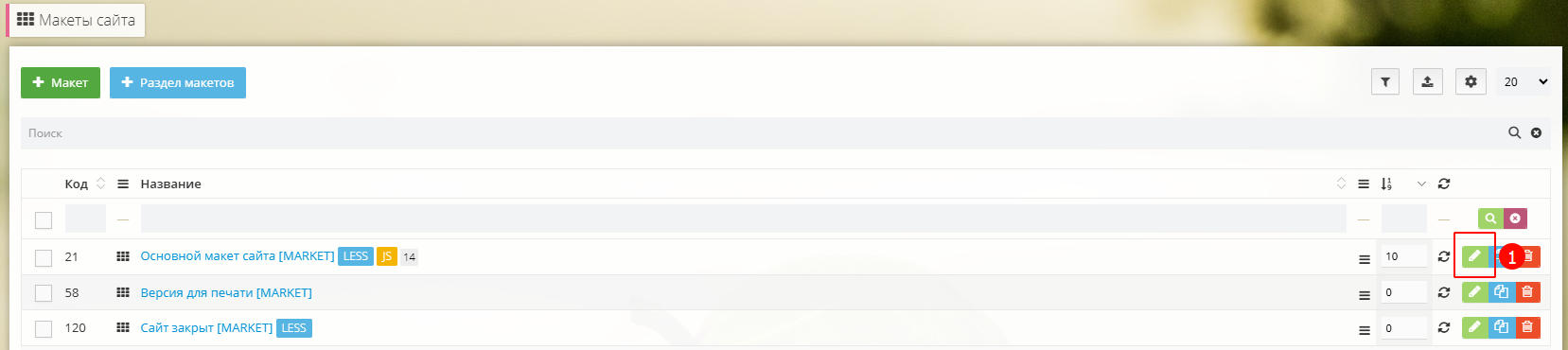
Перейдите в главный макет вашего сайта **Структура сайта -> Макеты сайта** и нажмите "Редактировать" (1)

<div data-full-width="true"><figure><img src="/files/XrPbTYlQ7pQS6EonDXs5" alt=""><figcaption></figcaption></figure></div>

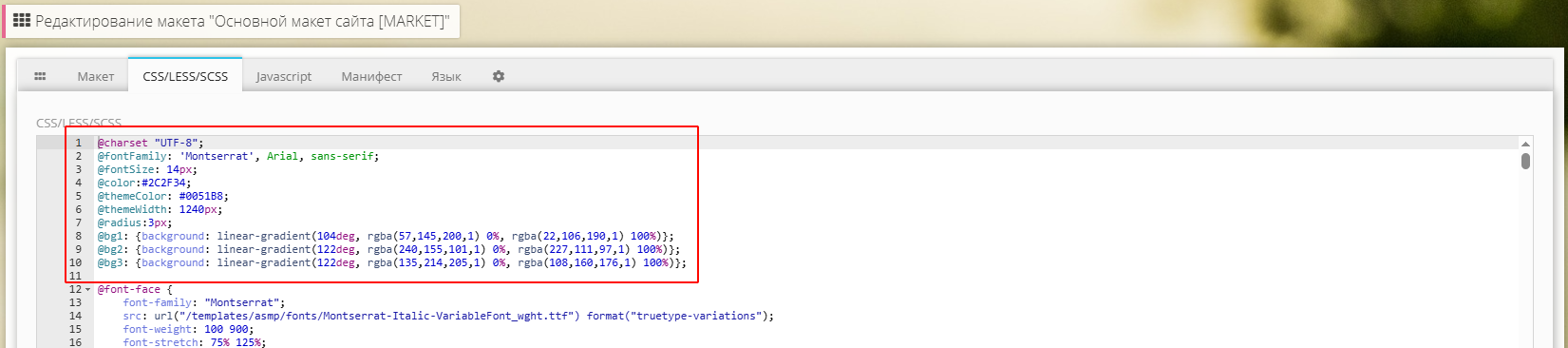
Перейдите во вкладку "CSS/LESS/SCSS", в самом начале указаны основные переменные стиля сайта

<div data-full-width="true"><figure><img src="/files/xs2t8HdwPafFzAyb2RKE" alt=""><figcaption></figcaption></figure></div>

@fontFamily - основной шрифт сайта `Montserrat` (так же поддерживает Lato, Inter, Noto Sans)¹

@fontSize - основной размер шрфита сайта (`14px`)

@color - основной цвет текста сайта (`#2C2F34`)

@themeColor - основной фирменный цвет сайта (`#0051B8`)

@themeWidth - максимаьная ширина сайта (`1240px`)

@radius - основной радиус закругления углов у элементов (`3px`)

@bg1, @bg2, @bg3 - цвет фона для блоков [Баннеров на слайдере](/market/dizain-glavnaya/bannera-na-slaidere.md)

{% hint style="warning" %}
¹При указании шрифта подключите их из папки /templates/asmp/fonts/ через @font-face
{% endhint %}
<pre class="language-css" data-full-width="true"><code class="lang-css"><strong>/* Montserrat */
</strong><strong>@font-face {
</strong>    font-family: "Montserrat";
    src: url("/templates/asmp/fonts/Montserrat-Italic-VariableFont_wght.ttf") format("truetype-variations");
    font-weight: 100 900;
    font-stretch: 75% 125%;
    font-style: italic;
    font-display: swap;
}
@font-face {
    font-family: "Montserrat";
    src: url("/templates/asmp/fonts/Montserrat-VariableFont_wght.ttf") format("truetype-variations");
    font-weight: 100 900;
    font-stretch: 75% 125%;
    font-style: normal;
    font-display: swap;
}

/* Inter */
@font-face {
    font-family: "Montserrat";
    src: url("/templates/asmp/fonts/Inter-Italic-VariableFont_opsz,wght.ttf") format("truetype-variations");
    font-weight: 100 900;
    font-stretch: 75% 125%;
    font-style: italic;
    font-display: swap;
}
@font-face {
    font-family: "Montserrat";
    src: url("/templates/asmp/fonts/Inter-VariableFont_opsz,wght") format("truetype-variations");
    font-weight: 100 900;
    font-stretch: 75% 125%;
    font-style: normal;
    font-display: swap;
}

/* Noto Sans */
@font-face {
    font-family: "Noto Sans";
    src: url("/templates/asmp/fonts/NotoSans-Italic-VariableFont_wdth,wght.ttf") format("truetype-variations");
    font-weight: 100 900;
    font-stretch: 75% 125%;
    font-style: italic;
    font-display: swap;
}
@font-face {
    font-family: "Noto Sans";
    src: url("/templates/asmp/fonts/NotoSans-VariableFont_wdth,wght.ttf") format("truetype-variations");
    font-weight: 100 900;
    font-stretch: 75% 125%;
    font-style: normal;
    font-display: swap;
}

/* Lato */
@font-face {
  font-family: "Lato";
  src: url("/templates/asmp/fonts/Lato-Thin.ttf") format("truetype");
  font-weight: 100;
  font-style: normal;
  font-display: swap;
}
@font-face {
  font-family: "Lato";
  src: url("/templates/asmp/fonts/Lato-Light.ttf") format("truetype");
  font-weight: 300;
  font-style: normal;
  font-display: swap;
}
@font-face {
  font-family: "Lato";
  src: url("/templates/asmp/fonts/Lato-Regular.ttf") format("truetype");
  font-weight: 400;
  font-style: normal;
  font-display: swap;
}
@font-face {
  font-family: "Lato";
  src: url("/templates/asmp/fonts/Lato-Medium.ttf") format("truetype");
  font-weight: 500;
  font-style: normal;
  font-display: swap;
}
@font-face {
  font-family: "Lato";
  src: url("/templates/asmp/fonts/Lato-Semibold.ttf") format("truetype");
  font-weight: 600;
  font-style: normal;
  font-display: swap;
}
@font-face {
  font-family: "Lato";
  src: url("/templates/asmp/fonts/Lato-Bold.ttf") format("truetype");
  font-weight: 700;
  font-style: normal;
  font-display: swap;
}
@font-face {
  font-family: "Lato";
  src: url("/templates/asmp/fonts/Lato-Black.ttf") format("truetype");
  font-weight: 900;
  font-style: normal;
  font-display: swap;
}
@font-face {
  font-family: "Lato";
  src: url("/templates/asmp/fonts/Lato-ThinItalic.ttf") format("truetype");
  font-weight: 100;
  font-style: italic;
  font-display: swap;
}
@font-face {
  font-family: "Lato";
  src: url("/templates/asmp/fonts/Lato-LightItalic.ttf") format("truetype");
  font-weight: 300;
  font-style: italic;
  font-display: swap;
}
@font-face {
  font-family: "Lato";
  src: url("/templates/asmp/fonts/Lato-Italic.ttf") format("truetype");
  font-weight: 400;
  font-style: italic;
  font-display: swap;
}
@font-face {
  font-family: "Lato";
  src: url("/templates/asmp/fonts/Lato-MediumItalic.ttf") format("truetype");
  font-weight: 500;
  font-style: italic;
  font-display: swap;
}
@font-face {
  font-family: "Lato";
  src: url("/templates/asmp/fonts/Lato-SemiboldItalic.ttf") format("truetype");
  font-weight: 600;
  font-style: italic;
  font-display: swap;
}
@font-face {
  font-family: "Lato";
  src: url("/templates/asmp/fonts/Lato-BoldItalic.ttf") format("truetype");
  font-weight: 700;
  font-style: italic;
  font-display: swap;
}
@font-face {
  font-family: "Lato";
  src: url("/templates/asmp/fonts/Lato-BlackItalic.ttf") format("truetype");
  font-weight: 900;
  font-style: italic;
  font-display: swap;
}
</code></pre>


---

# Agent Instructions: Querying This Documentation

If you need additional information that is not directly available in this page, you can query the documentation dynamically by asking a question.

Perform an HTTP GET request on the current page URL with the `ask` query parameter:

```
GET https://support.morozovpimnev.ru/market/nastroika-stilei-saita.md?ask=<question>
```

The question should be specific, self-contained, and written in natural language.
The response will contain a direct answer to the question and relevant excerpts and sources from the documentation.

Use this mechanism when the answer is not explicitly present in the current page, you need clarification or additional context, or you want to retrieve related documentation sections.
